
BasisAssistant + Projects & Tasks
AI Assistant for Creating and Tracking Tasks
Start with a conversation. Continue the work in BasisPanel.
When a request comes up in a conversation, the next step does not have to depend on notes or manual follow-up. BasisAssistant can collect the required information according to a defined structure and turn the request into one or more tasks in BasisPanel.
The task can be assigned within the organization’s approved roles and permissions, then tracked as work progresses. Project Managers and Operations Managers can also review overall project status, overdue tasks, tasks approaching their deadline, unassigned work, and items that need attention through a concise management summary.
Turn Conversations Into Trackable Work
This integration is designed for requests that begin in a conversation but need to continue as specific, trackable work.
The primary ready destination is Projects & Tasks in BasisPanel. BasisAssistant can collect the required information according to the structure defined for the use case, create a task, and move the next step into BasisPanel. This keeps the request connected to a clear project and task workflow instead of leaving follow-up outside the working system.
The integration is currently available as an Add-on. It is not part of the base-plan capability set and can be enabled on eligible plans according to the applicable commercial terms.
From a User Request to a Tracked Task
A clear path from conversation to action
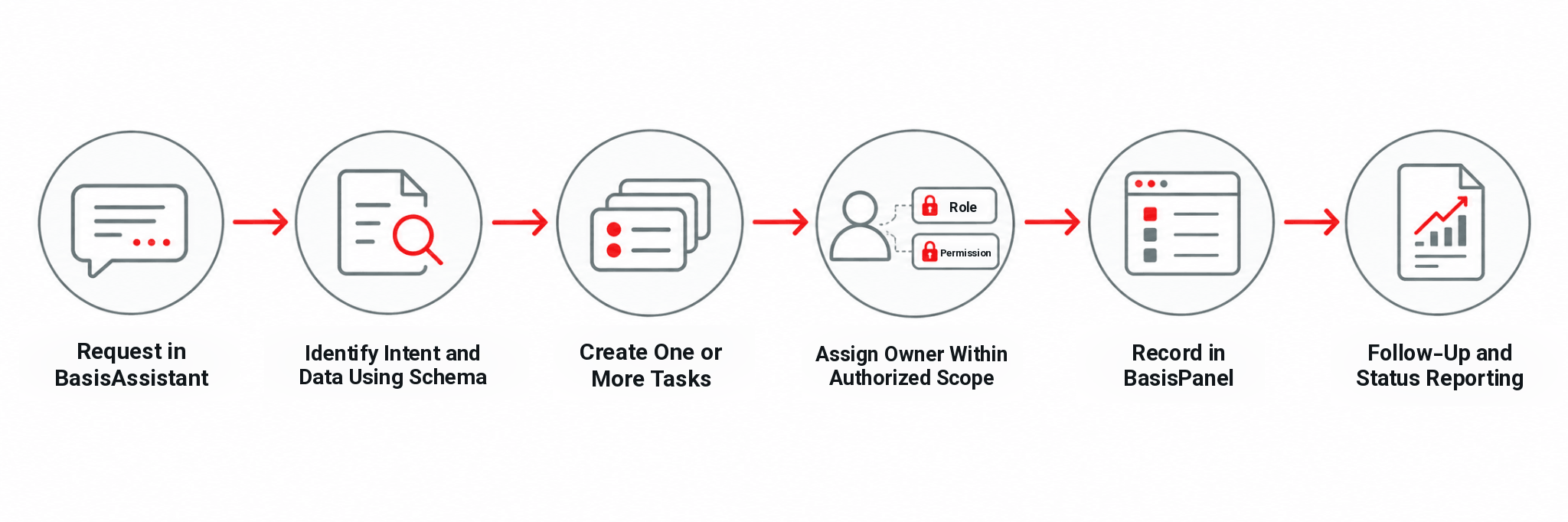
The information stored in each task can be structured around the needs of the organization. The same fixed fields do not have to be collected in every scenario. The defined schema determines what information is extracted from the conversation and recorded in Projects & Tasks in BasisPanel.
- 1
Capture the request
The user describes the required action or need in the conversation.
- 2
Identify intent and data
BasisAssistant identifies the intent and extracts the information required by the defined schema.
- 3
Create the task
A request can create one task or, when the scenario is designed for it, several independent tasks.
- 4
Assign responsibility
The assistant can assign the responsible person according to the project structure, defined roles, and business rules, provided the required permission exists.
- 5
Record the work in BasisPanel
The task is created in Projects & Tasks so the work can continue in a trackable operational context.
- 6
Follow progress
BasisAssistant can review project status and surface overdue tasks, tasks approaching their deadline, unassigned work, or items that need attention in a management summary.
Projects & Tasks in BasisPanel
What Can the Assistant Do?
Every action remains subject to user permissions and organizational policy
Within Projects & Tasks in BasisPanel, BasisAssistant can perform the approved task and project actions through the API. Each action is executed only within the user’s permitted Role, project Scope, and configured Policy.
Create, view, and edit tasks
View task lists
View task or project status
Assign or change the responsible person
Record or change deadlines
Record or change priority
Change task status
Complete or close tasks
Add descriptions or files
Set reminders
Support follow-up actions
Send notifications through BasisPanel
Create or edit projects for authorized company-level internal assistants and permitted roles
Provide a summary of project status and tasks that require attention
Not Every Decision Is Delegated to AI
Your rules define what the assistant can decide and what it can record
BasisAssistant can record or update a deadline and priority, but it does not currently determine those values autonomously. The value must come from an explicit user instruction, a defined schema, or a clear system rule.
Responsibility can be assigned according to the project structure, roles, and configured rules, but only when the user and assistant are operating within their authorized scope.
This separation allows AI to support execution without automatically taking management decisions that have not been defined by the organization.
The Assistant Works Within the User’s Authorized Scope
Access, approval, and activity history are part of the action flow
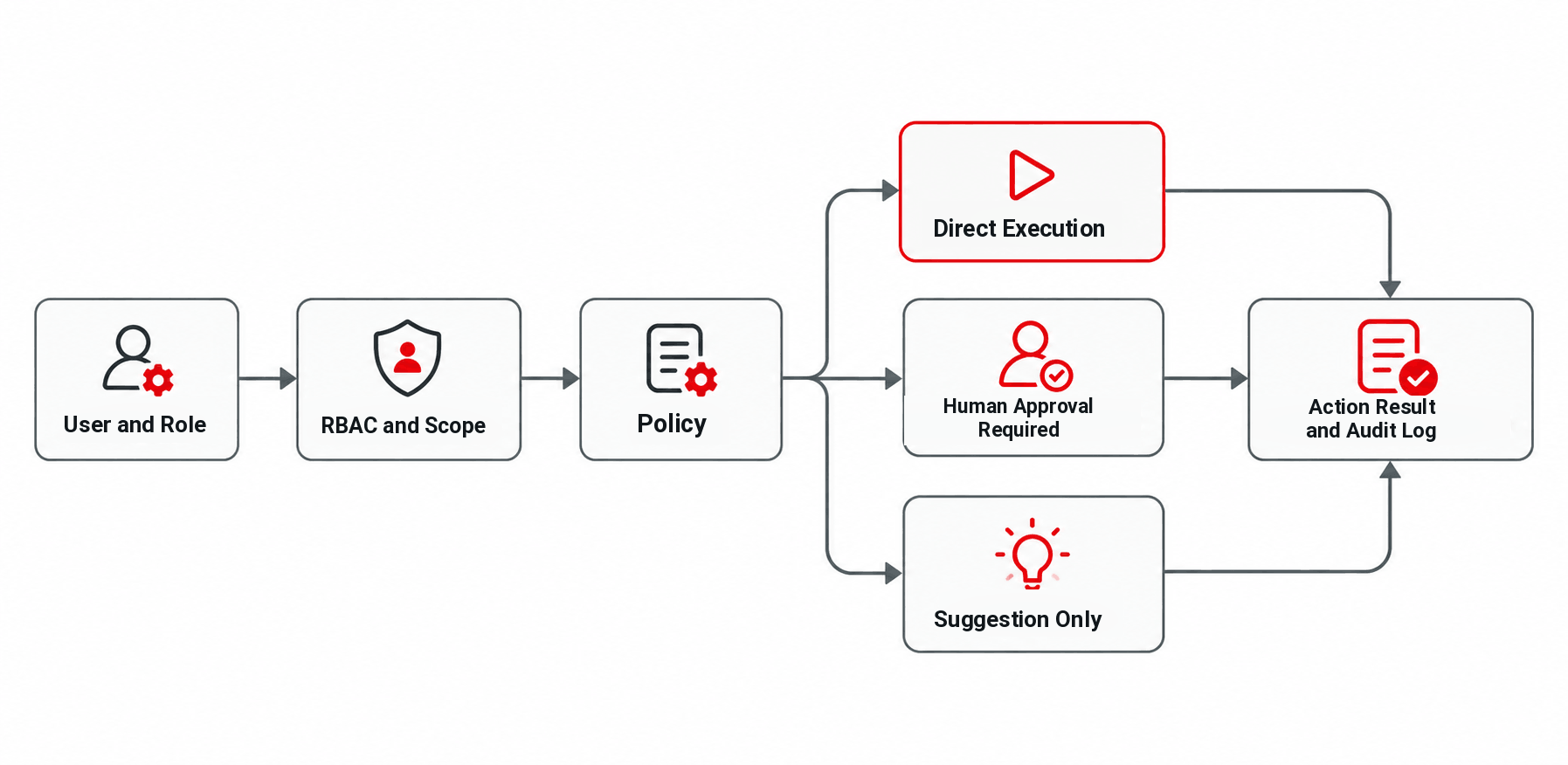
BasisAssistant can only view or change tasks and projects that the current user is allowed to access. Role-Based Access Control, project Scope, and organizational policies define that boundary.
Each action can be configured in one of three ways: direct execution, execution after human approval, or suggestion only. Organizations can apply approval policies to sensitive operations according to their own requirements.
Actions performed by the assistant and their related changes are recorded in the Activity/Audit Log. The change history of each task can also be reviewed, giving the organization a traceable record of what happened and how the action was handled.
Access based on RBAC and project Scope
Direct execution or human approval, as configured
Suggestion-only mode when execution should remain manual
Approval Policy for sensitive operations
Assistant actions and changes recorded in the Activity/Audit Log
Task change history available for review
Success or error results displayed in BasisPanel
Connecting to Other Systems Starts With the API
Third-party connections depend on the destination API and individual integration review
The ready Integration covered by this page connects BasisAssistant with Projects & Tasks in BasisPanel. Third-party project-management systems are assessed individually rather than presented as pre-connected integrations.
If another system provides a suitable API, the connection can be assessed as an Integration project. Data mapping and supported actions are then designed around the destination API. An action available in BasisPanel should therefore not be assumed to be available in every external system.
For a third-party Integration, appropriate API access and credentials or permissions are required. Whether a Webhook or administrative access is also needed depends on the design of that Integration. The API & Webhooks page covers the approved ecosystem path for custom system connections.
Review destination API compatibility
Define the Integration Scope
Map the required data and supported actions
Prepare the required credentials and permissions
Implement and test the Integration
What Needs to Be in Place Before Setup?
Project structure and access rules should be defined before the Integration is activated
For the internal Integration, BasisAssistant and Projects & Tasks must be active. The project, Roles, access structure, and required schemas also need to be defined before the use case is configured.
The Manzoomeh team configures the Integration in cooperation with the customer’s system owner or manager. For an external Integration, the technical team responsible for the destination system must also participate where required.
Support for the internal connection is handled by the Manzoomeh BasisPanel team. For external Integrations, support responsibilities are defined according to the boundary between the Manzoomeh Integration and the destination system owner.
Active BasisAssistant
Active Projects & Tasks
Defined project structure
Defined Roles and access Scope
Required task and action schemas
For an external Integration: destination API access and required technical permissions
Current Capability Boundaries
The Integration works within a defined scope and controlled access model
The Integration has a defined operating scope. Some behaviors are intentionally outside the current generally available capability set.
Task dependency management is not currently presented as a generally available capability.
AI does not autonomously determine task deadlines.
AI does not autonomously determine task priority.
Project creation and editing by the assistant are intended for authorized company-level internal assistants and permitted roles.
If the required permission is missing, the action is not executed.
Role-Based Access Control cannot be bypassed by the assistant.
A permission failure does not currently trigger automatic escalation to another authorized person.
Actions in third-party systems are available only when the destination API supports them and the required Integration mapping has been defined.
Frequently Asked Questions About AI Task & Project Management
Can the assistant turn a conversation into a task?
Yes. The task schema can be configured around the organization’s needs and can define which information should be extracted from the conversation and recorded in the task.
Can one request create more than one task?
Yes. A single conversation or request can create multiple independent tasks when the defined Intent and Schema are designed for that scenario.
Does AI decide the deadline and priority on its own?
No. Recording and changing deadlines and priorities is supported, but AI does not currently determine those values autonomously. They must come from an explicit user instruction, a defined Schema, or a clear system rule.
Can the assistant assign a task owner?
Yes. Responsibility can be assigned according to the project structure, roles, and defined rules, provided the user and assistant have the required permission.
Can the assistant access every project and task in the organization?
No. BasisAssistant can only view or change tasks and projects that the current user is permitted to access under the applicable RBAC and project Scope.
Can sensitive actions require human approval?
Yes. An action can be configured for direct execution, human approval before execution, or suggestion-only behavior. The organization can define the appropriate Policy for different actions.
What happens if the user does not have permission for an action?
The action is not executed, and the user is informed that permission is missing or the operation cannot be completed. The request is not currently escalated automatically to another authorized person.
Are actions performed by the assistant logged?
Yes. Assistant actions and related changes are recorded in the Activity/Audit Log. The record includes at least the requesting user, time, action type, previous and new value or status, approver when applicable, and execution result. The change history of each task can also be reviewed.
Can this Integration work with other project-management systems?
The ready Integration on this page is with Projects & Tasks in BasisPanel. A third-party system can be assessed for Integration when it provides a suitable API. The actions that can be supported depend on the destination API and the mapping defined for that Integration project.
Is this Integration currently available?
Yes. The BasisAssistant Integration with Projects & Tasks in BasisPanel is currently available as an Add-on. A working demo of the Integration is also available.