AI for Sales and Customer Support

BasisAssistant: AI Assistant for Sales and Customer Support

Answer from approved knowledge and connect each conversation to the right next step.

BasisAssistant is an AI-powered sales and customer support assistant for website interactions. It works with the knowledge and rules approved by your organization, so users can ask questions, receive guidance, and provide the information needed to continue their journey.

It goes beyond a basic FAQ chatbot. A conversation can move into lead capture, a demo request, meeting booking, ticket creation or routing, or a controlled handoff to a human specialist when human judgment or action is required. You can start without replacing your current website or adopting the entire product ecosystem at once. BasisAssistant supports a Land–Validate–Expand approach: begin with one defined use case, review what happens in practice, and expand the scope only after the value and limitations are clear.

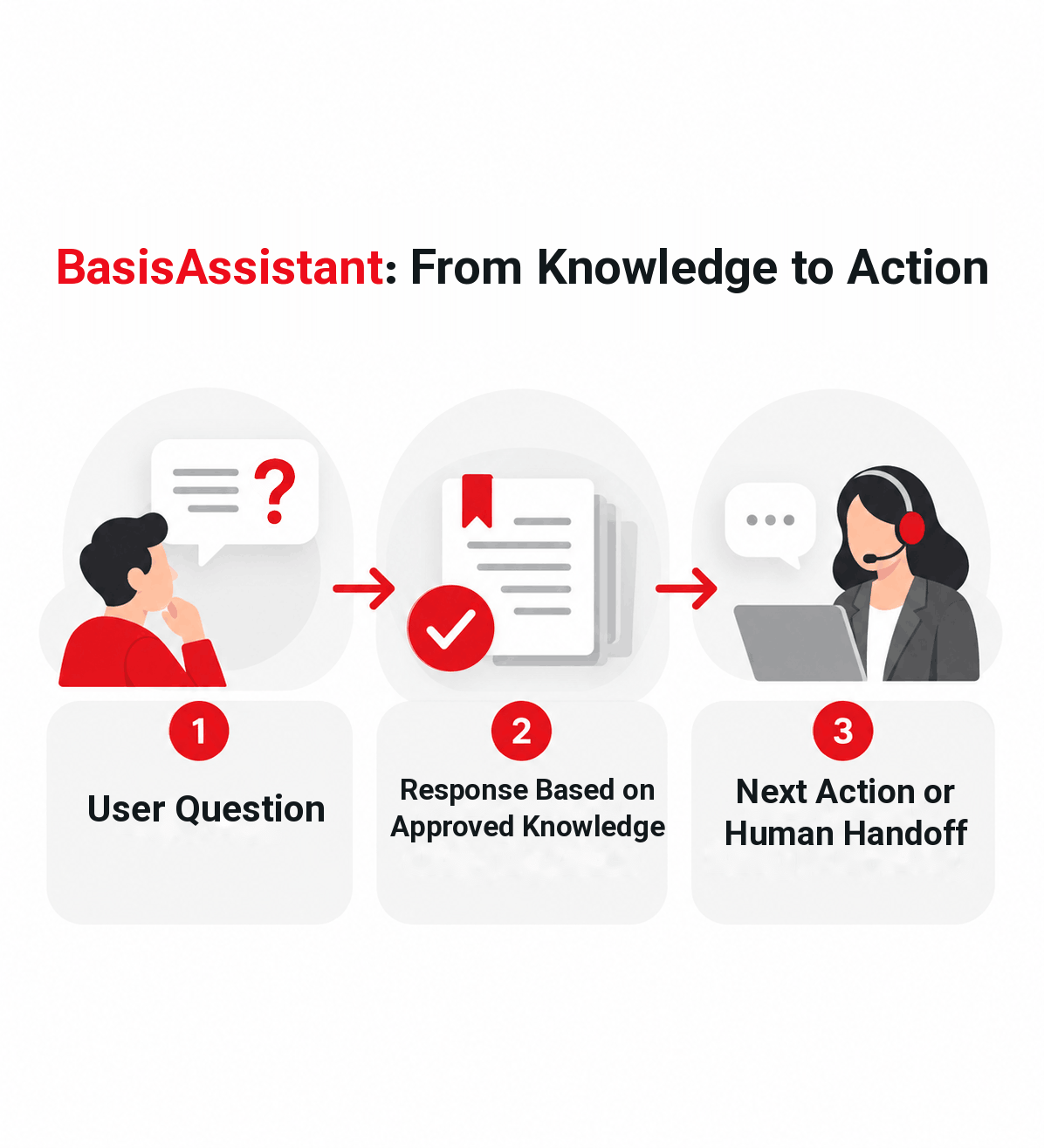
Concept illustration of BasisAssistant connecting a user question to an approved-knowledge response and then to a next action or human specialist.
Response, action, and human control in one defined path.

When an answer does not lead to a next step, customer demand loses momentum

Many customer interactions begin with a simple question: Which product is right for me? How does this service work? Where should I submit my request? Who should I speak to next?

When every answer depends on a person being available, some requests wait unnecessarily. Sales and support specialists also spend time repeating the same basic information. Answers may vary between people or departments, and the contact details or context needed for follow-up may not be captured consistently.

BasisAssistant connects the initial response to approved organizational knowledge and gives the conversation a clearer path forward.

  • Questions may remain unanswered when the right person is unavailable.
  • Sales and support teams spend time on recurring first-line questions.
  • Answers may vary between people or departments.
  • Contact details and user needs may not be captured consistently.
  • The path from an initial answer to sales or support follow-up may be unclear.

Where should you start?

A useful starting point is a limited use case with an outcome you can evaluate.

Customer Support

If your team handles a high volume of recurring questions, support requests, or cases that may need escalation, BasisAssistant can provide the initial response from approved knowledge and move the conversation to a person when required. This gives customers a clearer first step while allowing specialists to focus on situations that genuinely need human involvement.

Sales and Lead Qualification

If the main challenge is understanding what a visitor needs and collecting useful information before sales follow-up, BasisAssistant can gather the relevant details during the conversation. The sales team receives more context for the next interaction instead of starting with an incomplete inquiry.

Enterprise Knowledge Access

If customers or employees have to search across pages, files, FAQs, or guides to find an answer, BasisAssistant can provide a more direct route to approved knowledge. The result is faster access to relevant information while the organization retains control over which sources the assistant may use.

From approved knowledge to response, action, and handoff

Every assistant should have a defined scope, trusted sources, and a clear next action.

Before BasisAssistant is put into use, the organization defines the problem it should handle, the sources it may use, and who is responsible for its knowledge and relevant settings.

During a conversation, the assistant works with the sources approved for that use case. When more context is required, it can ask the user for additional information before determining the next step.

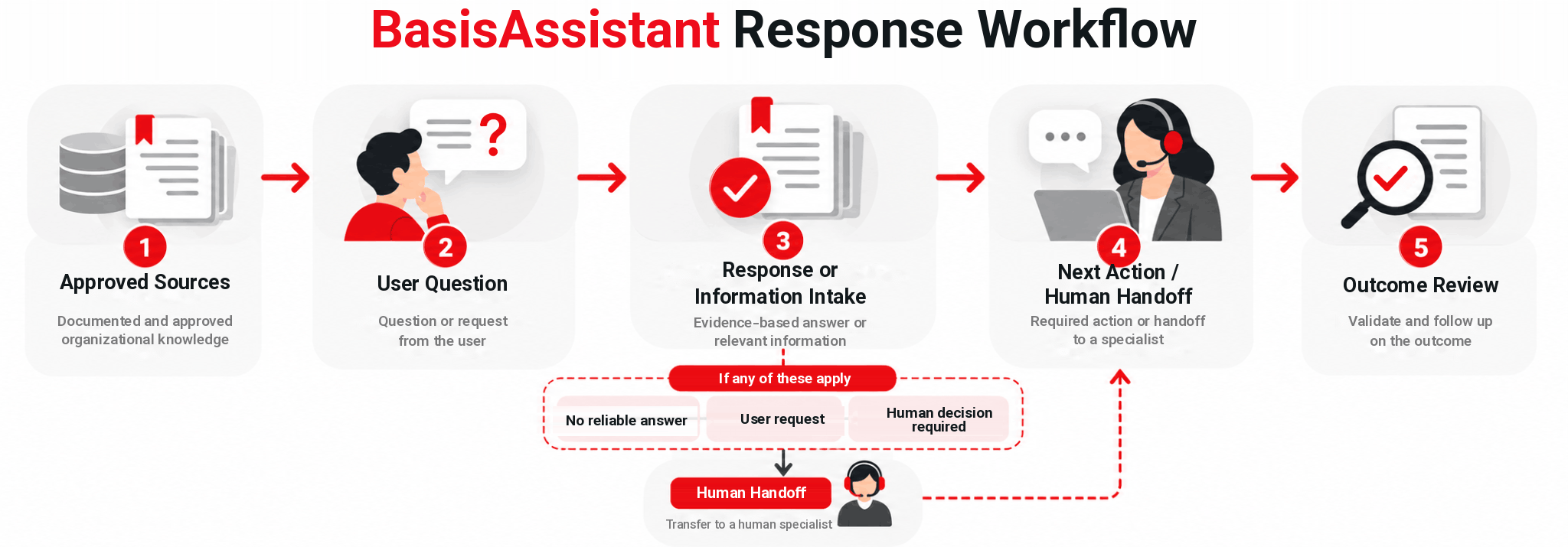
If a reliable answer is not available, confidence is low, the request falls outside the approved scope, or a human decision is required, BasisAssistant should not present an unsupported answer as certain. It can ask a follow-up question, make the uncertainty clear, or move the conversation to a human specialist.

  1. Define the problem and scope

    Set the topic, audience, response rules, and expected next action.

  2. Connect approved sources

    Make relevant website pages, FAQs, catalogs, documents, files, or structured information available within the approved knowledge scope.

  3. Answer and guide

    BasisAssistant responds from those sources or asks for additional information when more context is needed.

  4. Move to action or a person

    The conversation can continue into sales, support, ticketing, or a human handoff.

  5. Review the outcome

    Measure the use case against the KPIs selected for that specific scenario.

Workflow diagram showing BasisAssistant moving from approved knowledge to response, next action, Human Handoff, and outcome review.
Each use case starts with a defined source and ends with an outcome that can be reviewed.

You do not need a large data set to start. You need reliable sources.

Response quality depends on the quality of the source, the scope, and the ownership behind it.

BasisAssistant can work with sources such as documents and files, website pages and FAQs, structured information, product and service data, and information made available through approved integrations.

The knowledge scope should not include raw passwords or secrets, private keys, complete payment-card information, or data the organization does not have the legal or internal authority to use. Personal, confidential, financial, medical, or identity information should only be processed when there is a valid business need, an appropriate legal or organizational basis, and suitable access control.

Before starting, define:

  • The main problem and use case
  • The approved knowledge sources
  • The knowledge owner or reviewer
  • The data that may be used
  • The expected next action after a conversation
  • The conditions for Human Handoff
  • The KPIs used to evaluate the result

Where can BasisAssistant be used?

Every use case should have a defined problem, required data, next action, and success measure.

Customer Questions and Human Handoff

BasisAssistant can provide an initial response from approved knowledge. When the situation requires human review, judgment, or action, the conversation can move to the appropriate specialist.

Value in practice: Customers receive a more consistent first response while specialists stay focused on cases where human involvement matters.

Lead Capture and Qualification

BasisAssistant can collect contact details, the reason for the inquiry, and the initial information required by the sales process during the conversation.

Value in practice: Sales can continue with more useful context instead of starting from an incomplete lead.

Product or Service Guidance

Users can be guided toward a more relevant product, service, or course based on their stated needs. The guidance must remain grounded in approved product, service, or course information.

Value in practice: Users can narrow their options without manually reviewing every available page or offering.

Enterprise Knowledge Search

BasisAssistant can retrieve answers from relevant approved sources. When a citable source is available, the relationship between the answer and its source can also be retained.

Value in practice: Customers and teams get a faster, more controlled route to organizational knowledge.

Ticket Capture and Routing

The conversation can collect the initial information required for a support request and pass that context into the ticketing path for continued handling.

Value in practice: The receiving team starts with better initial context, reducing the need for the user to repeat the same explanation.

Request Intake

For requests that require specific information or documents before review, BasisAssistant can guide the user through the intake process step by step.

Value in practice: The receiving team starts with a more complete request before evaluation begins.

Capabilities

Control knowledge, responses, access, handoff, and outcomes through a defined operating model.

These six capabilities form the approved core capability set for BasisAssistant. Each has a dedicated page for a more detailed evaluation.

Knowledge Base & Approved Sources

Use sources approved by your organization as the basis for responses. This keeps the assistant connected to information selected for your business rather than relying only on general-purpose knowledge.

Human Handoff

Move the conversation to a person when the user requests it, confidence is low, the topic is sensitive, the request falls outside policy, or the next step requires human judgment or action.

Answer Citations & Sources

When an approved citable source is available, the response can retain a connection to that source. This makes it easier for authorized users to understand where an answer came from, while restricted sources remain subject to access controls.

Lead Capture & Qualification

Collect contact details, the user’s needs, and the initial information required for follow-up during the conversation. Sales receives a lead with more useful context for the next step.

Role-Based Access Control

Control access to knowledge sources, settings, reports, and management areas based on organizational roles. This helps separate responsibilities and restrict access to information according to the user’s role.

Outcome Analytics & Dashboard

Review assistant usage and the outcome of a use case against the metrics defined for that scenario. The purpose is to connect usage to an observable business result without promising the same improvement for every customer.

Response and data control are part of the product

BasisAssistant should work within the knowledge, roles, and policies defined by your organization.

Each organization works within its own organizational space, and user access can be controlled according to role. Customer data, documents, and source materials remain customer-owned. Customer data and content are not used by default to train public AI models.

Public connections and APIs use encrypted communication. Stored data is also protected through encryption controls at the storage layer. The exact control set can vary according to the deployment model and contractual scope.

If a reliable answer is unavailable, BasisAssistant should not manufacture certainty. A direct request for human help, low confidence, a sensitive or out-of-policy topic, a need for human action, or an unsuccessful response path can lead to Human Handoff.

Publicly Supported Controls

  • Customer ownership of input data and source materials
  • Separation of each organization’s workspace
  • Role-Based Access Control
  • Governance over approved knowledge sources
  • Encrypted communication
  • Human Handoff
  • Data deletion or export requests within the applicable role and contractual scope
  • Logging required for operational follow-up and security

When is BasisAssistant a good fit?

Fit depends more on the problem, the available knowledge, and execution readiness than on industry alone.

Higher Fit Lower Fit
Meaningful volume of recurring questions, requests, leads, or support interactions Limited usage with no defined recurring problem
Reliable sources such as FAQs, catalogs, website content, or internal guidance Unreliable information with no clear owner
A defined goal such as response, lead qualification, ticketing, intake, or guidance General interest in AI without a defined outcome
A manager or internal owner responsible for decisions and execution No accountable person for the initiative
Willingness to start with a limited scope and measure the result Expectation of a certain result without sufficient data or scope
Acceptance of staged expansion Expectation of unlimited customization from the beginning

Priority Industries

  • Technical & After-Sales Services
  • Private & Corporate Training
  • Professional Services & Compliance
  • Recruitment & Human Resources
  • Food Manufacturing & Distribution

These five industries are identified as priorities in the approved product and site architecture.

Measure the result against the use case

There is no single KPI that applies to every BasisAssistant deployment.

Success criteria should be selected before the use case begins and should match the actual business problem. The product architecture provides examples of useful KPIs by scenario, but the target value for any metric should be determined for the scope of the individual project.

Scenario Example Measures
Customer response and Human Handoff First-response time, resolution rate, handoff rate
Lead capture and qualification Qualified leads, completion rate, meeting rate
Product or course guidance Guidance rate, answer usefulness, conversion
Ticket capture and routing Ticket creation time, classification accuracy
Intake and document collection Request completeness, reduction in follow-up loops
Recruitment and coordination Screening time, resume completeness, interview scheduling

None of these measures is presented on this page with a guaranteed target or improvement percentage.

Start with one problem. Expand after the value is clear.

  1. 1. Land - Start with one defined use case

    Choose one limited problem, such as customer response, lead qualification, or enterprise knowledge access. Define the approved sources, response rules, Human Handoff conditions, and KPIs for that scenario. Starting with BasisAssistant does not require a full website replacement.

  2. 2. Validate - Review quality and outcome

    Review the quality of the responses and the practical outcome of the selected use case. The purpose of this stage is to understand the real value and limitations before increasing the scope.

  3. 3. Expand - Connect additional processes when needed

    After the first use case has been validated, the project can expand into approved integrations or related business processes. The exact scope and data flow of each connection should be reviewed for that specific integration.

BasisAssistant FAQ

Is BasisAssistant just an FAQ chatbot?

No. Answering recurring questions is one use case, but BasisAssistant can also guide users from approved organizational knowledge, collect the information needed for the next step, and connect the conversation to an action or a human specialist.

Does BasisAssistant replace sales or customer support teams?

No. Its role is to increase response capacity and reduce repetitive work. Requests that require investigation, experience, judgment, or human action can be handed to the appropriate person.

Do we need to replace our current website before using BasisAssistant?

No. BasisAssistant is defined as an independent entry point and does not require a full website migration before you can start. The deployment method should be selected according to the scope and architecture of the individual project.

AI Assistant + Website

What information can BasisAssistant use to answer questions?

Approved sources can include website pages, FAQs, documents, files, structured information, and other sources the organization makes available for the use case. The organization should define which sources are trusted and who is responsible for managing them.

Knowledge Base & Approved Sources

What happens when there is no reliable answer?

BasisAssistant should not present an unsupported answer as certain. It can make the uncertainty clear, ask a follow-up question, suggest an appropriate source, or transfer the conversation to a human specialist.

Human Handoff

Is customer data used to train public AI models?

No. According to the approved security guidance, customer data and content are not used by default to train public AI models. Uses beyond direct service delivery must remain subject to the applicable customer settings or contractual controls.

Who owns the data and sources provided to BasisAssistant?

The customer owns the input data, documents, and source materials. Their use must remain within the applicable permissions, contractual terms, and third-party rights.

Can access to BasisAssistant be controlled by user role?

Yes. Each organization has its own organizational space, and access to knowledge, settings, and reporting areas can be separated according to user roles. Some advanced controls may depend on the deployment model or contractual scope.

Role-Based Access Control

See BasisAssistant on a Defined Use Case

Choose one sales, support, knowledge, or request-intake scenario and see how BasisAssistant handles that specific path.