Available for Implementation

AI Assistant + Ticketing: From Conversation to Trackable Request

Built for IT and service operations teams, this integration turns defined website conversations into BasisPanel tickets with the right context, routing, and follow-up path.

When a website conversation needs human review or further action, the request can move into the ticketing flow in BasisPanel. The information required for that process can be captured with the ticket, which can then be classified and routed according to the rules defined for that request.

The integration is released and available for implementation. Its core connection is already in place. Request types, ticket fields, routing rules, roles, and handling stages are then configured around the way each organization works.

Request a Demo

See the ticket creation, routing, handling, and follow-up flow with sample data.

When an Answer Is Not Enough, Create a Trackable Ticket

A conversation can move into a defined handling process without losing the information needed for the next step.

Not every conversation should end with an automated answer. A user may ask for follow-up, a case may need a human decision, a reliable answer may not be available, or a predefined request type may need to enter the ticketing process. In these situations, BasisAssistant can create a ticket in BasisPanel according to the configured flow.

The information stored with the ticket is determined by that request flow. It can include the full conversation, a conversation summary, an attachment when that has been enabled, or other fields specifically defined for handling that type of request.

This turns the conversation into a structured request that can be classified, routed, handled, updated, and followed through a defined process rather than remaining an isolated chat interaction.

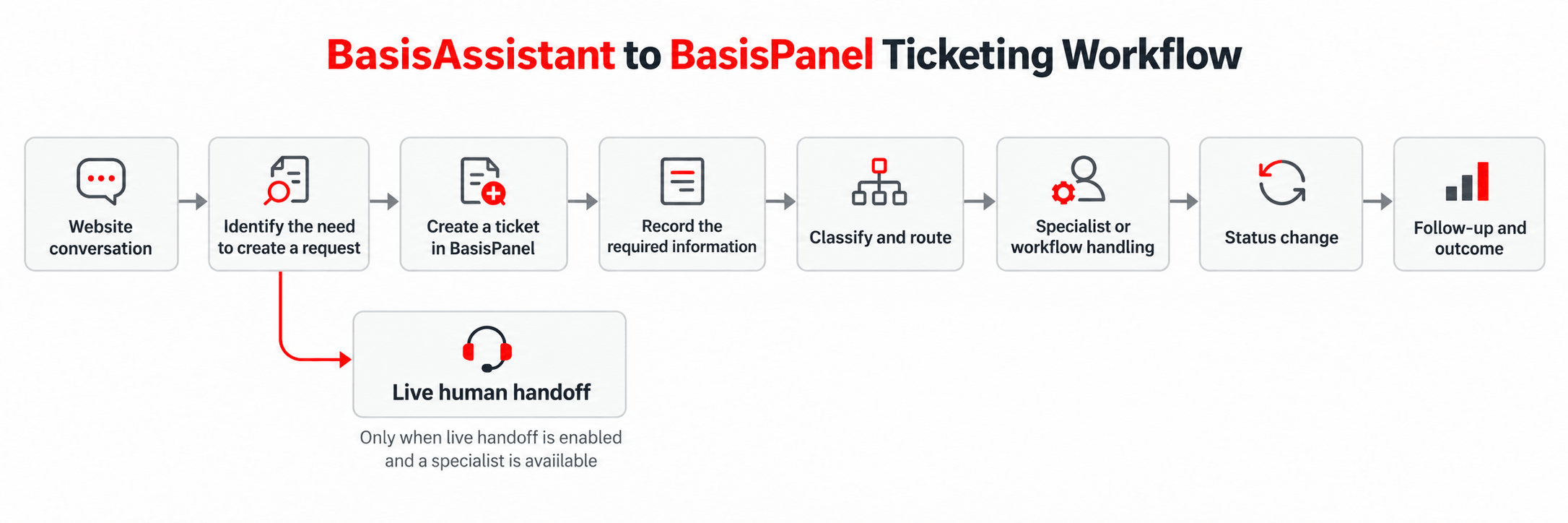
From Conversation to Ticket Handling and Follow-Up

The details can be configured for each organization, while the core connection follows a clear operational flow.

1

Identify when a ticket is needed

A ticket can be created when the user directly asks for follow-up, the request needs human review, no reliable answer is available, a sensitive topic is identified, or a predefined rule for that request is triggered. If the configured flow requires user confirmation before ticket creation, that confirmation can be included as part of the same process.

2

Create the ticket and provide a reference

Once the relevant flow is triggered, the ticket can be created in BasisPanel. A ticket number or reference can then be shown to the user and used as one of the available follow-up paths.

3

Record only the information required for that request

Each request flow defines the information its ticket needs. The ticket can contain the full conversation, a summary, an attachment where enabled, or other fields defined specifically for that request. The principle is to transfer the information required for handling that ticket rather than apply one fixed data structure to every conversation.

4

Classify and route the ticket

Classification can combine BasisAssistant’s interpretation, predefined rules, and correction by an authorized specialist. Routing can be configured around the request topic, product or service, customer type, priority, organizational unit, a team or queue, or an individual specialist.

5

Handle the request and update its status

Authorized specialists and managers can review the ticket and change its status. BasisAssistant or the workflow can also perform approved status transitions when those transitions have been defined in advance. Sensitive actions can be configured to require human approval.

6

Follow the request and view the outcome

The main confirmed follow-up paths are the ticket reference, the user account, and the responsible specialist. If a dedicated follow-up flow or assistant has been configured, BasisAssistant can also retrieve permitted ticket status information from BasisPanel and present it to the user.

Workflow showing a BasisAssistant conversation becoming a BasisPanel ticket, followed by data capture, classification, routing, handling, status changes, and follow-up
From a website conversation to a handled and trackable ticket in a defined workflow.

The Integration Is Ready; the Process Is Configured Around Your Organization

Most implementations adapt an existing connection rather than rebuild the integration from the beginning.

The core connection between BasisAssistant and BasisPanel ticketing already exists. Before implementation, the required scenarios, ticket structure, ticket fields, responsible roles, routing rules, and handling flow are reviewed and agreed.

The following elements can vary by organization:

Request types and ticket categories
Ticket fields and required information
Ticket statuses and permitted handling stages
Routing rules for teams, queues, or individual specialists
Roles and access levels
The information transferred from the conversation
Notification requirements
Reporting requirements
Rules for automatic actions or human approval

Standard configuration does not necessarily require a separate development project. If a requirement falls outside the existing capabilities or requires an additional integration, that work is scoped separately.

For those requirements, timing and cost are defined after the scenario has been reviewed.

Bring in a Specialist When Human Judgment Is Needed

A conversation can move to a live specialist or continue as a ticket for later handling.

Human handoff can be triggered when the user asks to speak with someone, the request needs a human decision, the topic is sensitive, no reliable answer is available, or a predefined rule requires handoff.

If a specialist is available and live handoff has been enabled for that flow, the conversation can be transferred in real time. Otherwise, a ticket can be created so the request continues through the defined handling process.

The specialist can access the conversation history that has been permitted for that ticket and can record the response and ticket actions in BasisPanel. In a live handoff or a dedicated follow-up flow, the specialist’s response can also be presented back to the user.

Control Ticket Data and Actions by Role

Each role can be limited to the information and actions required for its part of the process.

Viewing, routing, changing the status of, and closing a ticket can be controlled through defined roles and permissions. Typical roles can include the end user, specialist or operator, team manager, system administrator, and approved system actions performed by BasisAssistant or a workflow.

The full conversation does not need to be visible to every user. Access can be restricted by role, team, and data type. Personal or sensitive information is only stored or displayed when the relevant request flow includes an approved field and permission for that information.

Ticket actions and changes can be recorded and followed by authorized roles. End users are limited to the actions made available to them in the relevant flow rather than receiving unrestricted access to internal ticket operations.

What Needs to Be Defined Before Implementation?

The request structure and internal responsibilities should be clear before the ticket flow is configured.

Both BasisAssistant and the ticketing capability in BasisPanel need to be active for this integration. In its current scope, this page covers BasisAssistant running on the website.

Before implementation, the main parts of the process should be defined:

The scenarios that should create a ticket
The structure and required fields for each ticket type
Responsible teams, users, and roles
Classification and routing rules
Access levels for each role
Handling stages and permitted status changes
Authentication or validation requirements for viewing sensitive ticket information

This page covers the connection between BasisAssistant and the internal ticketing capability in BasisPanel. If a project requires a connection to another system or functionality outside the existing configuration, that requirement is reviewed separately before the implementation scope is finalized.

File and data limits, notification channels, and response commitments can vary by implementation. Where relevant, they are defined as part of the approved project or service terms rather than treated as universal defaults.

See the Full Ticket Flow in a Demo

The demo uses sample data to show the working flow between BasisAssistant and BasisPanel ticketing.

The demo runs a prepared scenario in a live test environment. It can show the conversation with BasisAssistant, detection of a request that needs a ticket, ticket creation, classification, routing, recording the required information or summary, specialist response, status changes, follow-up, and the resulting outcome.

The demo uses sample data rather than real customer information. Its purpose is to make the working flow visible before implementation and show which parts of the process can be configured around the organization’s own requirements.

Frequently Asked Questions About AI Assistant + Ticketing

Is the BasisAssistant and Ticketing integration available now?

Yes. The integration between BasisAssistant and the internal ticketing capability in BasisPanel is released and available for implementation. The core connection and main ticket actions are already available, while the details of each implementation are configured around the organization’s process.

Does the integration have to be developed from scratch for every organization?

No. The core connection already exists. Request types, ticket fields, routing rules, roles, and handling stages are configured for each organization. Separate development is only considered when a requirement falls outside the existing capabilities or requires an additional integration.

When can BasisAssistant create a ticket?

A ticket can be created when the user directly requests follow-up, the request needs human review, no reliable answer is available, a sensitive topic is identified, or a predefined rule is triggered. If user confirmation is required for that specific flow, the confirmation step can be included before ticket creation.

What information can be added to the ticket?

The information depends on the request flow. A ticket can include the full conversation, a summary, an attachment where that has been enabled, or other fields specifically defined for that request. Only the information required for the configured handling process needs to be transferred.

How are tickets classified and routed?

Classification can combine BasisAssistant’s interpretation, predefined rules, and correction by an authorized specialist. Routing can be based on the request topic, product or service, customer type, priority, organizational unit, team or queue, or an individual specialist.

How can a user follow the status of a ticket?

The main follow-up options are the ticket reference, the user account, and the responsible specialist. If a dedicated follow-up flow or assistant has been configured, BasisAssistant can also retrieve permitted ticket status information from BasisPanel and present it to the user.

Can the conversation be transferred directly to a human specialist?

Yes. If live handoff is enabled for that flow and a specialist is available, the conversation can be transferred in real time. Otherwise, a ticket can be created so the request can continue through the defined handling process.

Does this integration connect to every external ticketing platform?

No. This page covers the connection between BasisAssistant and the internal ticketing capability in BasisPanel. If an organization needs a connection to another system, its feasibility and implementation scope are reviewed separately.

See the Ticket Flow Before You Implement It

Use the demo to see how a website conversation becomes a ticket, how the required information is captured, how the request is routed and handled, and which parts of the process can be configured for your organization.

Request a Demo