
BasisPanel Use Case
Connect Form Submissions to a Trackable Workflow
Turn each form submission into the start of a defined workflow.
For operations managers, the work often begins after a form is submitted. In this use case, the information is stored as a record in BasisPanel and the workflow starts automatically.
Based on the submitted information, the request follows the appropriate route, reaches the relevant owner or role, and moves to human approval when needed. The form becomes the start of a defined, trackable process.
See how this form-to-workflow scenario can apply to a defined business process.
A Form Creates More Value When the Next Action Is Clear
In many business processes, collecting information is only the first step. Once a request is submitted, the next action, responsible person, and any human decision points need to be clear.
If a form is disconnected from the process that follows, the submission alone does not move the work forward. Connecting it to a workflow provides a route for review and follow-up.
The goal is not to add another form, but to connect the information already collected to the work that comes next.
How Does a Form Enter the Workflow?
From data capture to routing and the next decision
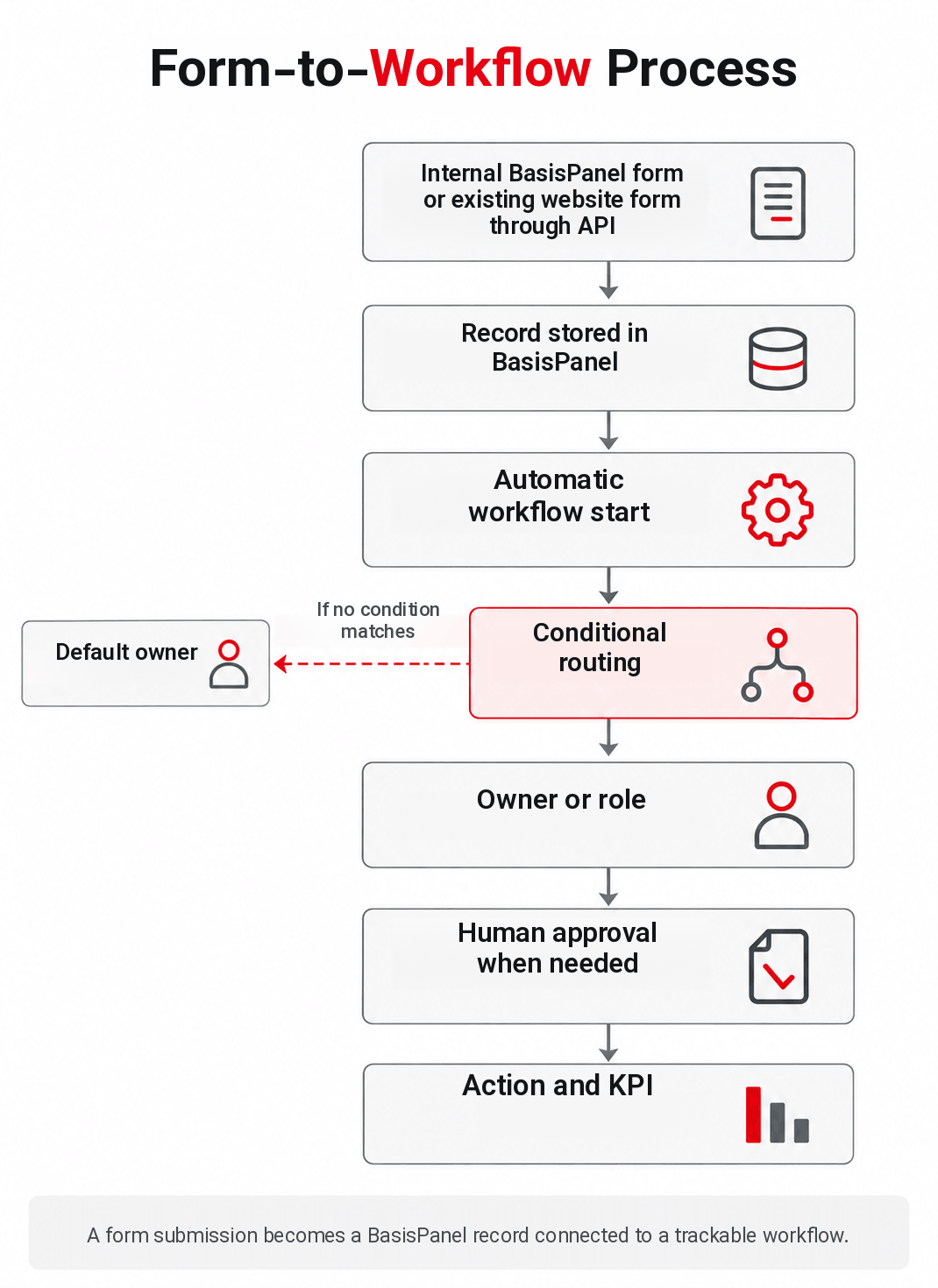
The form is connected directly to the process that follows. The core flow is:
The form is submitted. It can be an internal BasisPanel form or a form on the company's existing website.
The information is stored in BasisPanel as a record, and the workflow stays connected to that record.
The workflow starts automatically. No separate manual action is needed for a new submission.
The appropriate workflow is selected. One form can start different workflows based on the submitted information.
The request is routed to the relevant owner or role. If no condition matches, it goes to the default owner.
Human approval can be included where needed as a defined step in the workflow.
The next action is completed and the process is tracked through status changes and operational KPIs.
What Data Can Enter the Workflow?
Form data stays connected to the record used by the workflow
The process can start with an internal BasisPanel form or a form on the company's existing website. Existing website forms connect through API.
Submitted data is stored as a BasisPanel record, and the workflow remains linked to it. The supported data includes text fields, user information, and file attachments.
Required fields can change by request type or condition. Duplicate detection warns the user when a repeated submission is found, while still allowing the submission to continue.
- Text fields
- User information
- File attachments
- Information required to determine the workflow path
Keep Human Approval Where It Matters
Automation moves the process forward while human decisions remain part of the workflow
Not every request should proceed from submission to completion without a human decision. An approval step can route the request to the relevant owner or role when a decision is required.
If a request is rejected or needs correction, the configured workflow determines whether it ends, returns to the submitter, moves back a step, or is sent for correction. After correction, it can return to the approval path as configured.
Notifications and request status visibility can also support this process. Specific channels and notification rules depend on the workflow configuration.
What Can Happen After the Form Is Reviewed?
Each downstream action has a defined delivery scope
A workflow can do more than change a request status. The delivery scope for each downstream action is clear, distinguishing standard capabilities from configuration and custom development.
Action | Delivery scope in this use case |
|---|---|
Change status | Standard |
Create or update a record in BasisPanel | Standard |
Create a case | Standard |
Start another workflow | Available with configuration |
Create a customer or lead in the integrated CRM | Available with configuration |
Create a ticket | Available with configuration |
Create a project | Custom development / SOW |
Send or update data in another system or website | Custom development / SOW |
What Can You Measure in the Workflow?
Operational metrics that make the workflow easier to track
Once the workflow is running, the process owner can look beyond the status of a single request to review request volumes and the time taken across the process.
Operational reports and KPIs for this use case include:
- Number of forms and requests by status
- Number of forms and requests by form or request type
- Number of requests by owner or business unit
- Number of items waiting for approval
- Number of overdue items
- Time from submission to first action
- Time spent in each workflow step
- Total workflow duration
- Number of correction or revision loops
- Workflow completion rate
Requirements and Boundaries of This Use Case
The core capability is defined; each workflow is configured around the business process
Connecting internal BasisPanel forms to a workflow is a standard product capability. Workflows, routing conditions, and other settings are configured for the customer's process.
Forms on an existing company website connect through API. Authentication, CMS considerations, and technical arrangements depend on the agreed implementation scope.
This use case applies to new form submissions. The workflow starts automatically, but manually starting or rerunning a workflow for previously stored records is not supported.
Some downstream actions are standard, including creating cases or creating and updating BasisPanel records. Creating projects or exchanging data with other systems requires custom development under a separate scope of work (SOW).
- Internal BasisPanel forms: standard capability, configured for the customer's workflow
- Existing website forms: connected through API
- Workflow start: automatic for new form submissions
- Previously stored records: manual start or workflow rerun is not supported in this use case
- Extensions beyond standard scope: handled through defined configuration or custom development
Form-to-Workflow Integration FAQs
Can internal BasisPanel forms connect directly to a workflow?
Yes. Connecting an internal BasisPanel form to a workflow is a standard product capability. The workflow settings are configured for the customer's process.
Can we connect a form from our existing website?
Yes. An existing website form can connect to BasisPanel through API. The technical connection details depend on the agreed implementation scope.
When does the workflow start after a form is submitted?
For a new submission, the workflow starts automatically. Manual start or rerun on previously stored records is not supported in this use case.
What happens if none of the routing conditions match?
The request is assigned to the default owner.
What happens if a request is rejected or needs correction?
The next step follows the workflow configuration. The process can end, return to the submitter, move back to a previous step, or be routed for correction. After correction, the request can return to the approval path according to the workflow settings.
Can the submitter update the form after submission?
Yes. Updating or completing the submitted form information is a standard capability.
Which KPIs can be reviewed for this workflow?
KPIs include request volumes by status, type, owner or business unit; items waiting for approval; overdue items; time to first action, each step and total duration; correction loops; and the workflow completion rate.