
BasisAssistant Pilot Planning Tool
Define a Clear Starting Scope for Your AI Assistant Pilot
Bring the problem, knowledge, channel, actions, responsible roles and success criteria into one structured pilot plan before technical or commercial review.
A useful pilot starts with a focused problem, measurable success criteria and clear ownership. The Pilot Scope Builder helps you choose a practical BasisAssistant use case, identify the required knowledge and channel, define assistant actions, and establish roles and KPIs. The output is an initial pilot scope proposal, not a substitute for technical review, a Proposal, Statement of Work (SOW) or contract.
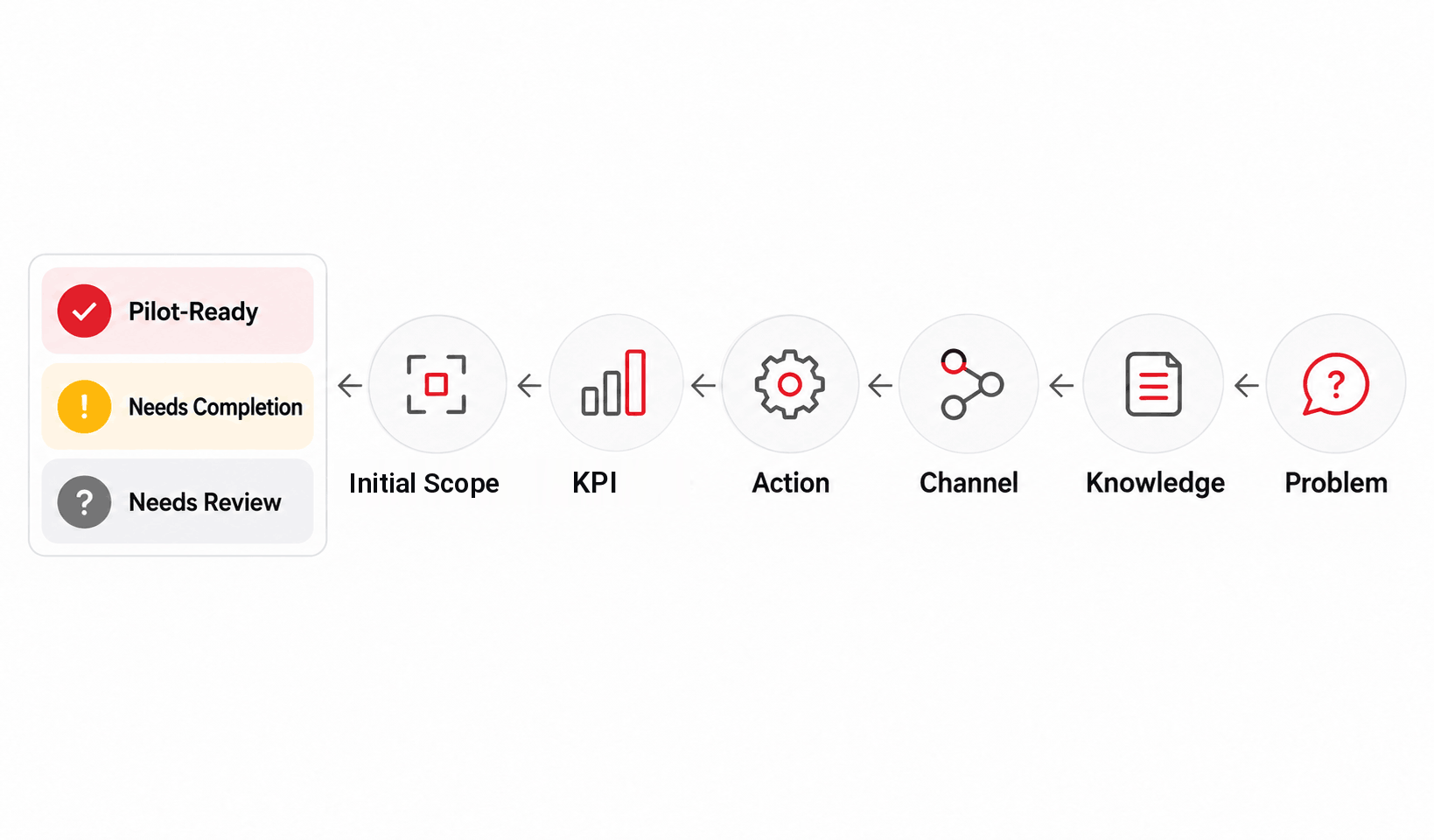
Start With One Specific Problem
Keep answers focused on one practical, limited use case. Do not enter sensitive personal, confidential, security-related or contract-restricted information.
Only enter information needed for your pilot problem, knowledge, roles and KPIs. Do not enter sensitive personal, confidential, security-related or contract-restricted information. Content answers are not retained after the active session; non-content events may be recorded for tool analytics.
Keep the Baseline Pilot Small and Measurable
The goal is not to solve every organizational need in one project. Test a clearly defined scope so the next decision is evidence-based.
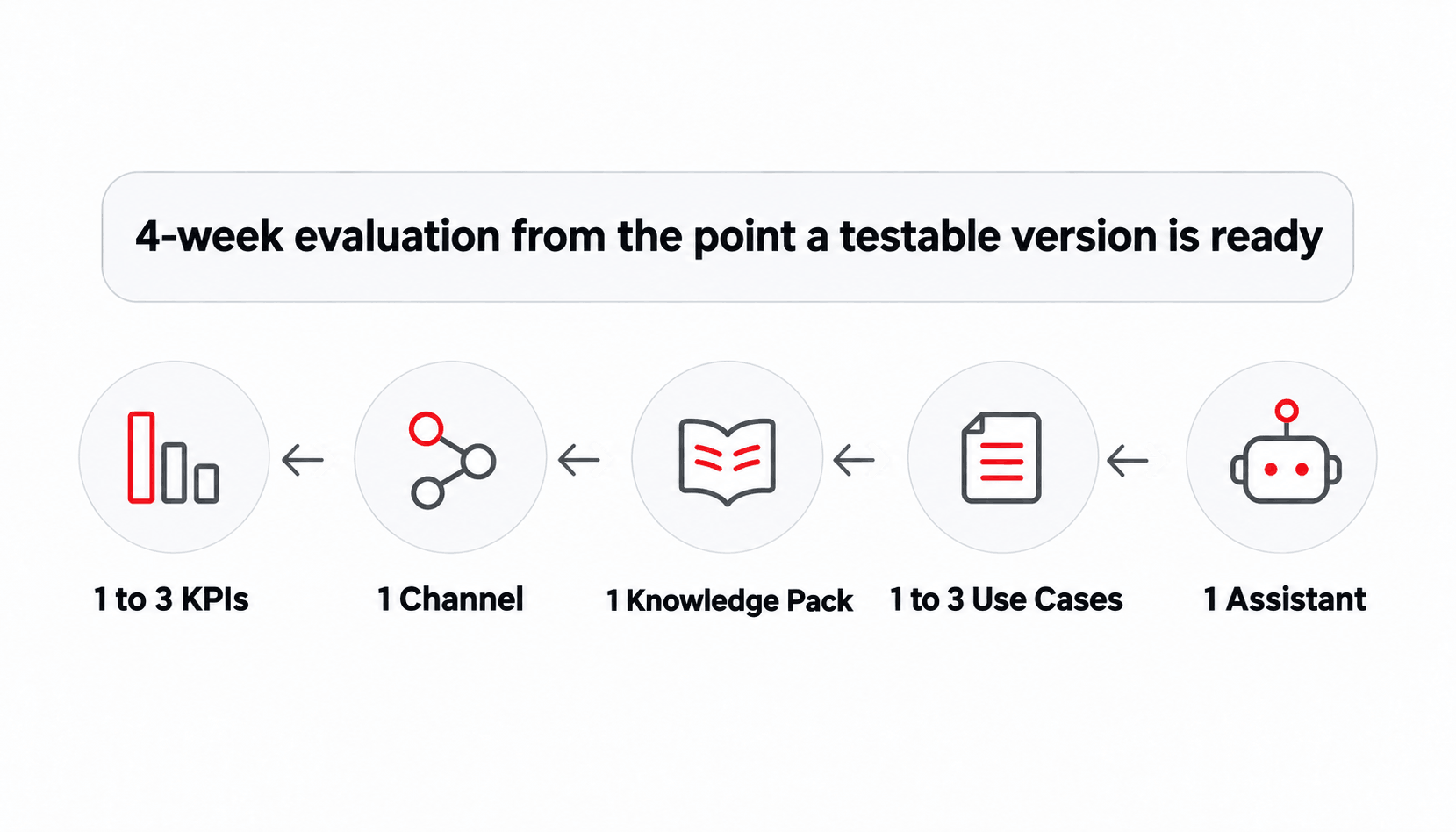
The baseline model is designed for a focused BasisAssistant pilot, combining a fixed core with a few limited choices.
Baseline Framework
- Knowledge:
- Internal ownership:
What Counts as a Use Case?
A use case represents one clear problem with a defined audience, relevant data, expected actions and measurable success criteria. “Transform all customer service with AI” is too broad for a first pilot. “Answer recurring product questions and hand off cases requiring human review” is a more focused scenario.
Knowledge Sources That Can Be Reviewed
- Web pages
- FAQ content
- Text content
- Word or PDF files
- Approved documents and catalogs
The actual quality, size and technical readiness of these sources are checked during technical review.
Initial Customer Responsibilities
- Provide and approve usable knowledge and data.
- Assign an Owner.
- Provide required access.
- Complete UAT.
- Review the result and acceptance criteria.
Initial Manzoomeh Negaran Responsibilities
- Configure the assistant.
- Prepare approved knowledge and settings.
- Complete pilot QA and deployment.
- Guide the customer team through evaluation.
- Summarize results and possible next steps.
Get an Initial Scope You Can Review
Your result follows your answers and approved rules, not unrestricted estimates or promises.
The result uses fixed rules and approved templates. If AI supports the written summary, its role is limited to making your answers clearer; it must not invent capabilities, pricing, SLA commitments, implementation timelines or other promises.
What the Result Can Include
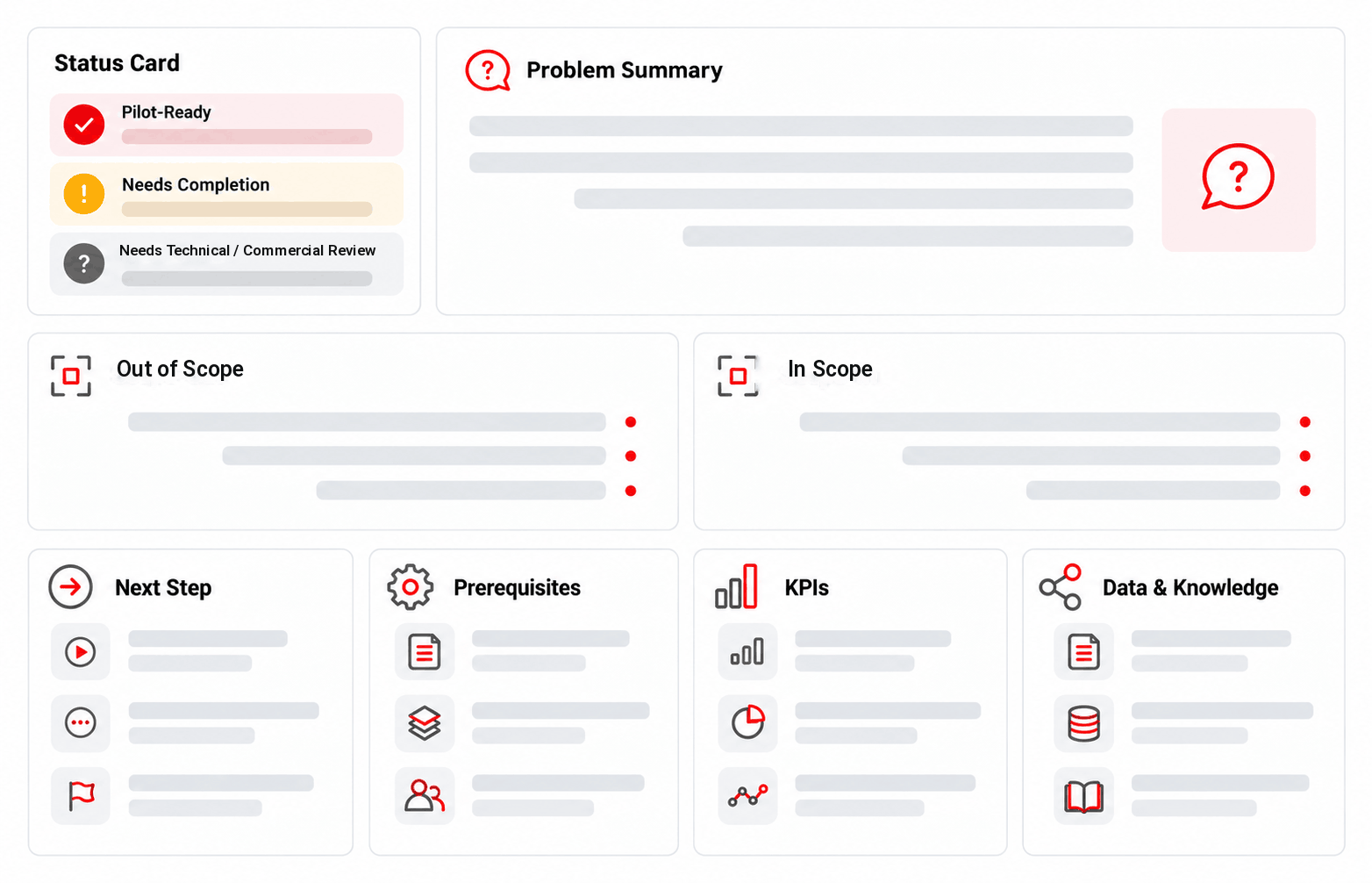
- Problem and pilot objective
- Proposed scenario
- In-scope items
- Out-of-scope items
- Required data and knowledge
- Proposed channel
- Assistant actions and human handoff
- Roles and responsibilities
- Selected KPIs
- Initial acceptance criteria
- Prerequisites and assumptions
- Limitations and risks
- Items requiring Discovery or technical review
- Possible expansion path
- Non-contractual legal notice
- Option to book a meeting after reviewing the full result
Result Status
The tool does not display a numerical readiness score. Instead, your result receives one of three practical statuses:
Pilot-Ready
A focused problem, the required data, Owner and KPI information are available.
Needs Completion
Required information, data, ownership, UAT responsibility or KPI definition is incomplete.
Needs Technical / Commercial Review
The scenario depends on an integration, custom development or another requirement outside the baseline scope.
Core Result Rules
- Missing data or ownership: define an Owner and identify usable knowledge before starting.
- No measurable KPI: select at least one indicator and a method of measurement.
- Use case too broad: narrow the problem to one to three independent use cases.
- Integration or custom work: review separately, outside the baseline pilot.
- Unconfirmed capability: obtain a technical review before making commitments.
- Incomplete or conflicting answers: correct them or continue with human review.
- No focused problem: begin with one clear, measurable use case.
- Expectation of guaranteed outcomes: the pilot evaluates, but does not guarantee, business results.
Result Functions
- Edit answers: Yes
- Recalculate: Yes
- Copy result: Yes
- Print: Yes
- Download PDF: Yes
- Save to account: Not in the baseline version
- Share by link: Not in the baseline version
- Send by email: Not in the baseline version
- Book a meeting: Only after viewing the result and explicitly choosing to continue
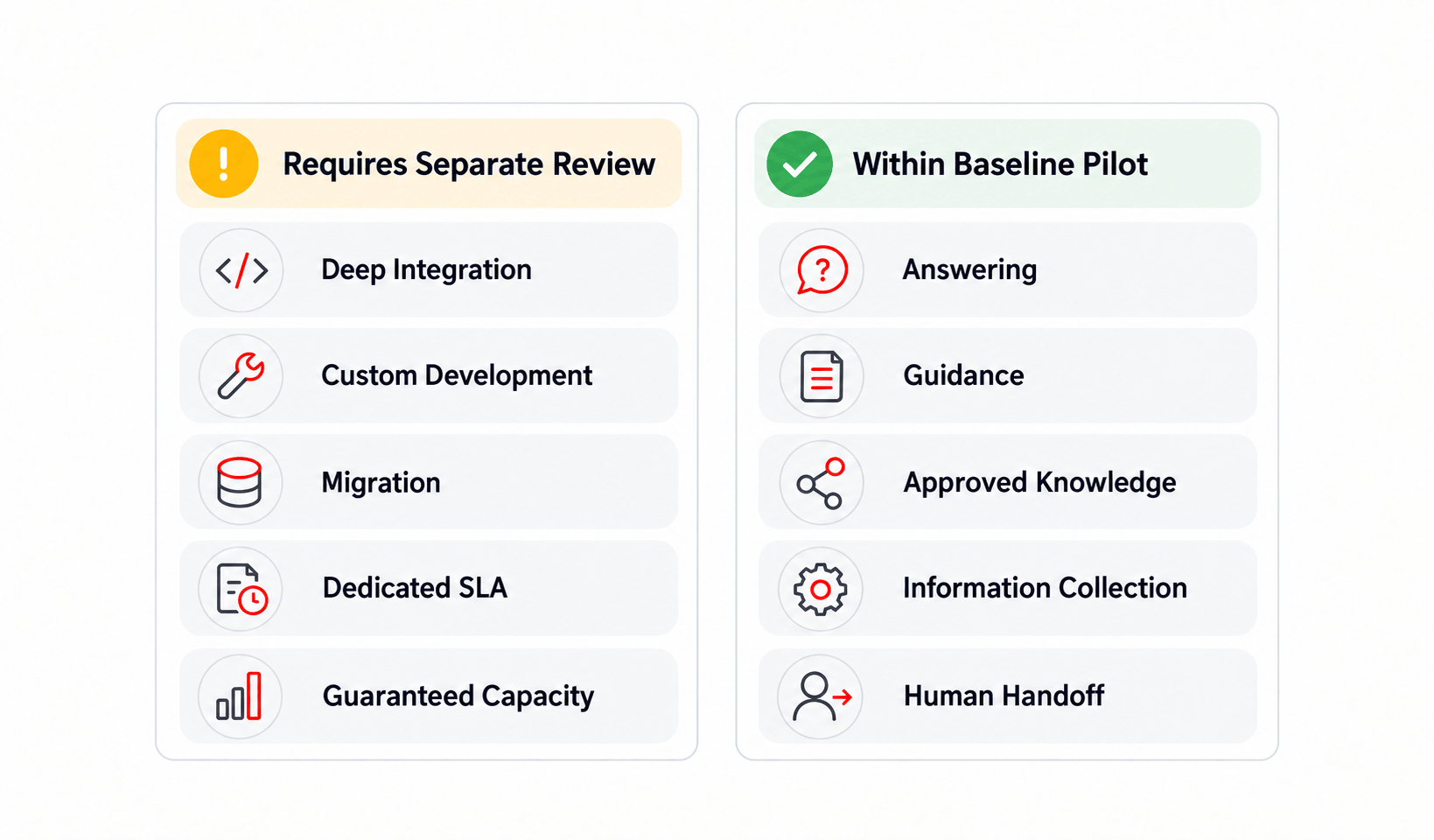
A Useful Pilot Needs Clear Boundaries
Larger requirements are not rejected. They are separated from the baseline pilot for Discovery, a Proposal or an SOW.
Within the Baseline Scope
- Answering clearly defined questions
- Guiding users
- Using approved organizational knowledge
- Collecting information within the scenario
- Directing users to a form or ticket
- Human handoff
- Product or service guidance within approved rules
Outside the Baseline Scope
- Custom development
- Deep integration
- Dedicated CRM, Ticketing, API or Workflow connections
- Data migration
- Large-scale knowledge preparation
- Custom security requirements
- Dedicated SLA commitments
- Guaranteed capacity
- Unreleased capabilities
- Sensitive transactional automation
When Does the Pilot Need Additional Review?
- Usable data or an Owner is not available.
- No UAT lead has been assigned.
- The problem remains too broad.
- A dedicated integration is required.
- The scenario depends on an unconfirmed capability.
- The expected outcome is treated as guaranteed.
These conditions do not necessarily make the project unsuitable. They mean the final scope needs additional review before any delivery commitment.
Define Success Before the Pilot Starts
The goal is evidence that can be evaluated, not a broad claim about AI.
Each pilot uses between one and three KPIs suited to the selected problem and scenario.
A comparison-based KPI requires a baseline. Measurement takes place during the pilot. Final acceptance criteria are confirmed through formal review; passing UAT does not guarantee business outcomes.
Practical Pilot Deliverables
- Configured assistant
- Approved final pilot scope
- KPI and UAT reporting
- Summary of results
- Suggested next expansion path
Only Enter Information Needed to Define the Pilot
Do not include sensitive personal, confidential, security-related or contract-restricted information in free-text fields.
The baseline tool can be used anonymously without an account. It does not request a name, email or phone number to generate your result. Answers about the problem, audience, knowledge, KPIs, roles and scope are used only to prepare the result and are retained for the active session, not stored permanently.
Non-content events that may be recorded for tool analytics include:
- Starting the tool
- Completing a step
- Generating a result
- Clicking the call to action
The content of user answers is not recorded in analytics. Analytics data is retained for up to 90 days under the approved policy. Choosing Book a Meeting after viewing the result is an explicit action. If a summary is transferred to a booking system or CRM, its retention and deletion follow that system’s policy.
The Result Is an Initial Proposal, Not a Contractual Commitment
A final scope becomes valid only after product, technical and commercial review.
This is an initial proposal, not a substitute for Discovery, technical review, a Proposal, Statement of Work (SOW) or contract. Pricing, timing, SLAs, capacity, security, integrations and final acceptance criteria require formal approval.
The Pilot Scope Builder produces an initial scope based on information entered by the user. Its purpose is to structure an early pilot definition and support a more focused technical and commercial discussion. Final feasibility depends on data quality, available access, infrastructure, publicly supported product capabilities, and customer readiness. Suggested KPIs do not guarantee results. Users are responsible for the accuracy of their inputs and should not enter sensitive personal, confidential, security-related, or contract-restricted information. Pricing, timelines, SLAs, capacity, security requirements, UAT conditions, integrations, and final acceptance criteria are valid only when included in an approved Proposal, Statement of Work (SOW), or contract. The generated result includes its date and tool version, and this legal notice is retained when copying, printing, or downloading the PDF.
Pilot Scope Builder FAQs
What type of pilot is the Pilot Scope Builder designed for?
The tool is designed to define an initial BasisAssistant pilot scope. It helps clarify one focused problem, the required knowledge, pilot channel, assistant actions, responsible roles, and initial KPIs. Multi-product pilots, deep integrations, and custom development are outside the baseline scope.
What is included in the baseline pilot framework?
The baseline framework includes one BasisAssistant, one to three use cases, one primary knowledge pack, one channel, and one to three KPIs. The evaluation period is four weeks from the point when a testable version is ready.
Is the tool result the final project scope?
No. The result is an initial proposal. A scope that can be included in a Proposal or SOW is created only after product, technical, and commercial reviews.
Does the tool show the price of the pilot?
No. The pilot is paid, but the tool does not display an amount. Pricing is determined only after scope review through the formal Proposal or pricing process.
What information do I need to use the tool?
You should define the problem, audience, current process, available knowledge, data readiness, Owner, channel, assistant actions, KPIs, and key roles. No name, email, or phone number is required to receive the result.
What happens if our knowledge or data is not ready yet?
The tool shows Needs Completion and identifies knowledge, data, or ownership requirements that must be addressed before the pilot starts.
What if the pilot needs a CRM, API, or other software integration?
Dedicated integrations are outside the baseline pilot. The tool flags the scope for a separate technical and commercial review.
Can I download the result?
Yes. You can copy, print, and download the result as a PDF. Account storage, public sharing links, and direct email delivery are not enabled in the baseline version.
Are my answers stored?
Content responses are not stored permanently and remain available only for the active session. Non-content events may be recorded for analytics, but the content of your answers is not recorded.
Does using the tool start a contract or commercial engagement?
No. A commercial next step starts only if you explicitly choose Book a Meeting after reviewing your result.
Does the pilot guarantee success or ROI?
No. The pilot evaluates a real problem against agreed KPIs. Business outcomes, ROI, SLA performance, and other final results are not guaranteed.
What can I do after I receive the result?
You can edit answers, recalculate, copy, print, or download the result as a PDF. After viewing the result, you can choose to book a meeting to discuss implementation.